ruby-libgd
Antialiasing & Alpha Blending
ruby-libgd supports truecolor, alpha-aware antialiasing for all drawing primitives. This allows Ruby to render smooth lines, curved shapes, layered graphics, and readable text.
Antialiasing works with:
- lines
- ellipses and circles
- polygons
- filled shapes
- text
and uses GD’s native truecolor pipeline with alpha blending.
Enabling antialiasing
img = GD::Image.new(900, 600)
img.antialias = true
Once enabled, all drawing operations are rendered using smooth, alpha-blended edges.
Colors and transparency
Colors in ruby-libgd are represented as arrays:
[r, g, b]        # RGB
[r, g, b, a]     # RGBA, a = 0..255
Helper methods are available:
GD::Color.rgb(255, 0, 0)
GD::Color.rgba(255, 0, 0, 120)
These values are converted internally into GD’s truecolor + alpha format.
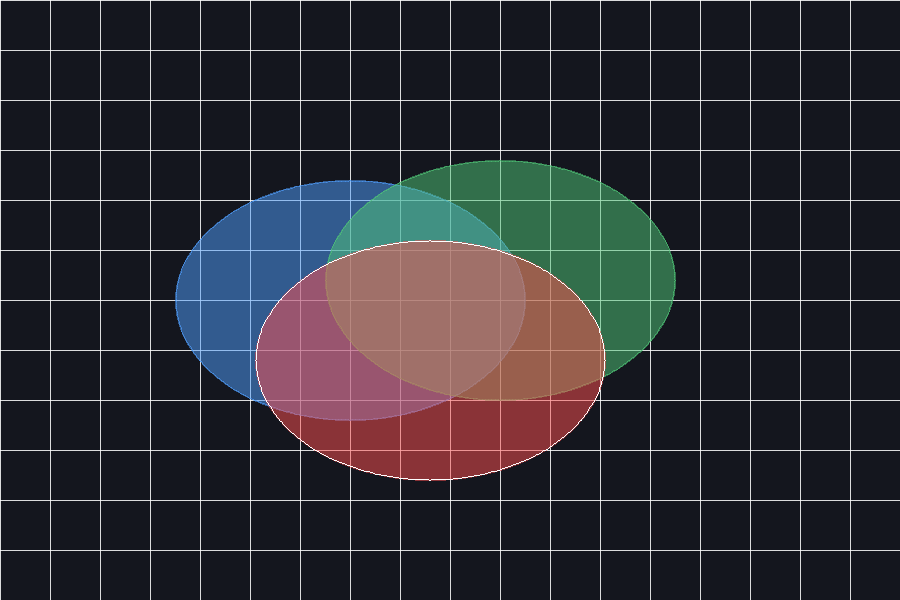
Antialiasing demo
This example renders overlapping translucent shapes, smooth outlines, and diagonal lines.
require "gd"

img = GD::Image.new(900, 600)
img.antialias = true

bg    = GD::Color.rgb(20, 22, 30)
grid  = GD::Color.rgba(255,255,255,40)
blue  = GD::Color.rgba(80,160,255,180)
red   = GD::Color.rgba(255,80,80,200)
green = GD::Color.rgba(80,200,120,180)
white = GD::Color.rgb(255,255,255)

img.filled_rectangle(0, 0, 899, 599, bg)

(0..900).step(50) { |x| img.line(x, 0, x, 599, grid) }
(0..600).step(50) { |y| img.line(0, y, 899, y, grid) }

img.filled_ellipse(350, 300, 350, 240, blue)
img.filled_ellipse(500, 280, 350, 240, green)
img.filled_ellipse(430, 360, 350, 240, red)

img.ellipse(430, 360, 350, 240, white)

img.save("antialias_demo.png")
Why antialiasing matters
Antialiasing is essential for:
- clean curved edges
- smooth diagonal lines
- overlapping translucent layers
- readable labels and text
- professional-grade visual output
This is the same rendering pipeline used by libgd-gis for map rendering.